Why Studios Outsource Game Art Today

· 7 min read
Author - Gamix Labs

There was a time when outsourcing game art was viewed primarily as a cost-cutting tactic. Studios turned to external vendors only when internal bandwidth ran short or deadlines became unmanageable. That perception has changed dramatically.

Why More Studios Are Outsourcing Game Art: The Strategic Advantage of External Art Partners

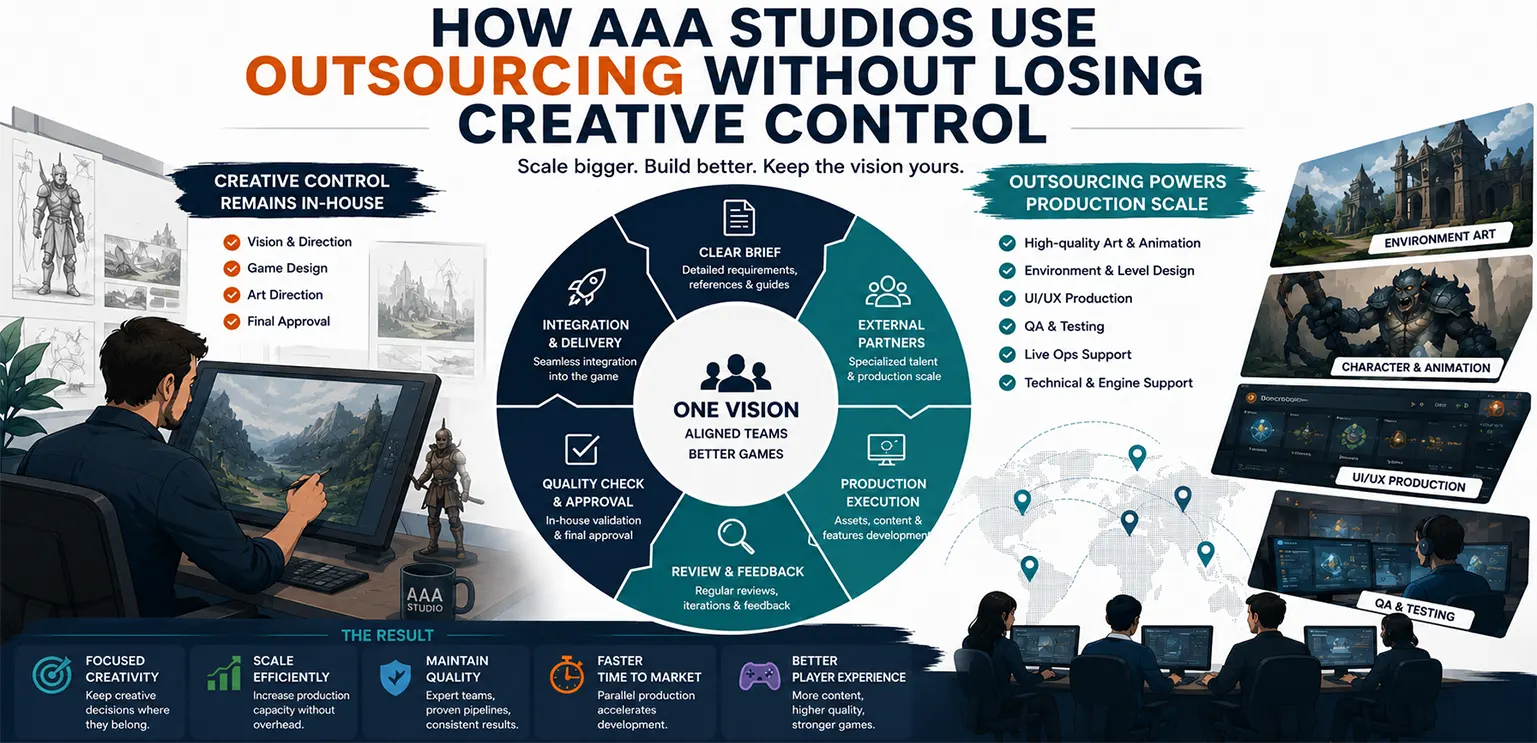
Today, outsourced game art is no longer treated as emergency support—it has become a core production strategy for studios of every size, from indie developers to AAA publishers and casino content providers. The reason is simple: Modern game production demands more content, faster iteration, and greater visual quality than many internal teams can sustainably deliver alone.

For studios scaling output without compromising quality, outsourcing has evolved from a convenience into a competitive advantage.


Industry Context: Why Internal Art Teams Alone Are Struggling to Scale

Game art requirements have grown significantly over the past decade. Games now demand not only higher visual fidelity, but also larger asset volumes, more content updates, platform-specific adaptations, and Live Ops-ready pipelines. This creates pressure across every art discipline:

  • Concept art
  • Environment production
  • Character design
  • UI/UX assets
  • Animation
  • VFX
  • Promotional creatives

Simultaneously, hiring and maintaining large in-house teams has become increasingly expensive and operationally complex. For many studios, scaling internal art departments fast enough to meet demand is no longer practical. That is why outsourced art partnerships are becoming standard in modern development pipelines.


Why Outsourced Game Art Has Become a Strategic Production Model

🔹 Access to Specialized Talent Without Permanent Headcount

One of the biggest advantages of outsourcing is immediate access to specialists. A studio may need stylized environment artists for one project, slot symbol designers for another, and cinematic UI animators for a Live Ops campaign. Building full-time internal teams for each niche is often inefficient. Outsourcing allows studios to access specialized expertise only when needed, creating far more flexible production models.

🔹 Faster Production Scaling During High-Demand Periods

Production demands are rarely consistent. Studios often experience spikes during:

  • Pre-launch asset creation
  • Feature expansions
  • Live Ops event production
  • Marketing campaign preparation

Outsourcing provides elastic capacity, allowing teams to scale output quickly without long-term hiring commitments. This flexibility is particularly valuable for studios managing multiple titles simultaneously.

🔹 Improved Cost Efficiency Without Sacrificing Quality

While outsourcing is not always "cheap," it is often more cost-efficient than expanding internal teams. Internal hiring includes salaries, benefits, management overhead, software costs, onboarding time, and utilization risk. With outsourcing, studios pay for deliverables and production capacity rather than maintaining permanent overhead. When managed correctly, this creates significantly better cost-to-output efficiency.


How Outsourcing Fits Into Modern Game Art Pipelines

The most effective studios do not treat outsourcing as isolated task delegation. Instead, they integrate external art teams directly into structured production pipelines.

This typically involves: Internal teams defining art direction, production standards, and review frameworks, while external partners execute asset creation within those systems. When properly integrated, outsourced teams function less like vendors and more like production extensions. This is especially common in slot and casino development, where high asset throughput and repeatable production systems make pipeline integration particularly valuable.

Studios such as Gamix Labs often operate within these models by aligning external production closely with internal pipeline standards—allowing partners to contribute production-ready slot symbols, UI systems, animations, and promotional assets without disrupting workflow continuity.


Outsourcing Beyond Cost: Why It Improves Strategic Focus

A major but often overlooked benefit of outsourcing is strategic focus. When internal teams are overloaded with production tasks, they have less time for:

  • Core gameplay innovation
  • Design iteration
  • Technical optimization
  • Creative experimentation

By offloading production-heavy art work, studios can keep internal talent focused on high-value creative and strategic tasks. This often improves not just efficiency, but overall product quality.


Common Outsourcing Models Used by Studios

Different studios structure outsourcing differently depending on scale and goals. Some use project-based outsourcing, where external teams deliver complete asset packages for specific milestones. Others adopt embedded team models, where outsourced artists function as long-term extensions of internal departments.

More mature studios often build hybrid pipelines, combining internal art direction with outsourced production execution. The best model depends on project complexity, content volume, and management maturity.


Challenges Studios Face With Outsourced Art

Despite its benefits, outsourcing is not without risks. The most common problem is poor pipeline integration. Studios that treat outsourcing as simple task delegation often encounter:

  • Inconsistent quality
  • Communication bottlenecks
  • Revision overload
  • Missed deadlines

Another issue is weak documentation. Without clear style guides, references, and production specs, outsourced teams struggle to match expectations. Outsourcing succeeds only when paired with strong internal production systems.


Best Practices for Successful Game Art Outsourcing

Studios that consistently succeed with outsourced art typically follow several principles. They establish clear visual documentation before production begins, including style guides, references, and technical specifications. They build structured review pipelines with regular feedback loops rather than waiting until final delivery. They also choose partners based on pipeline compatibility and specialization—not simply price. The best outsourcing relationships are built on production fit, not just budget.


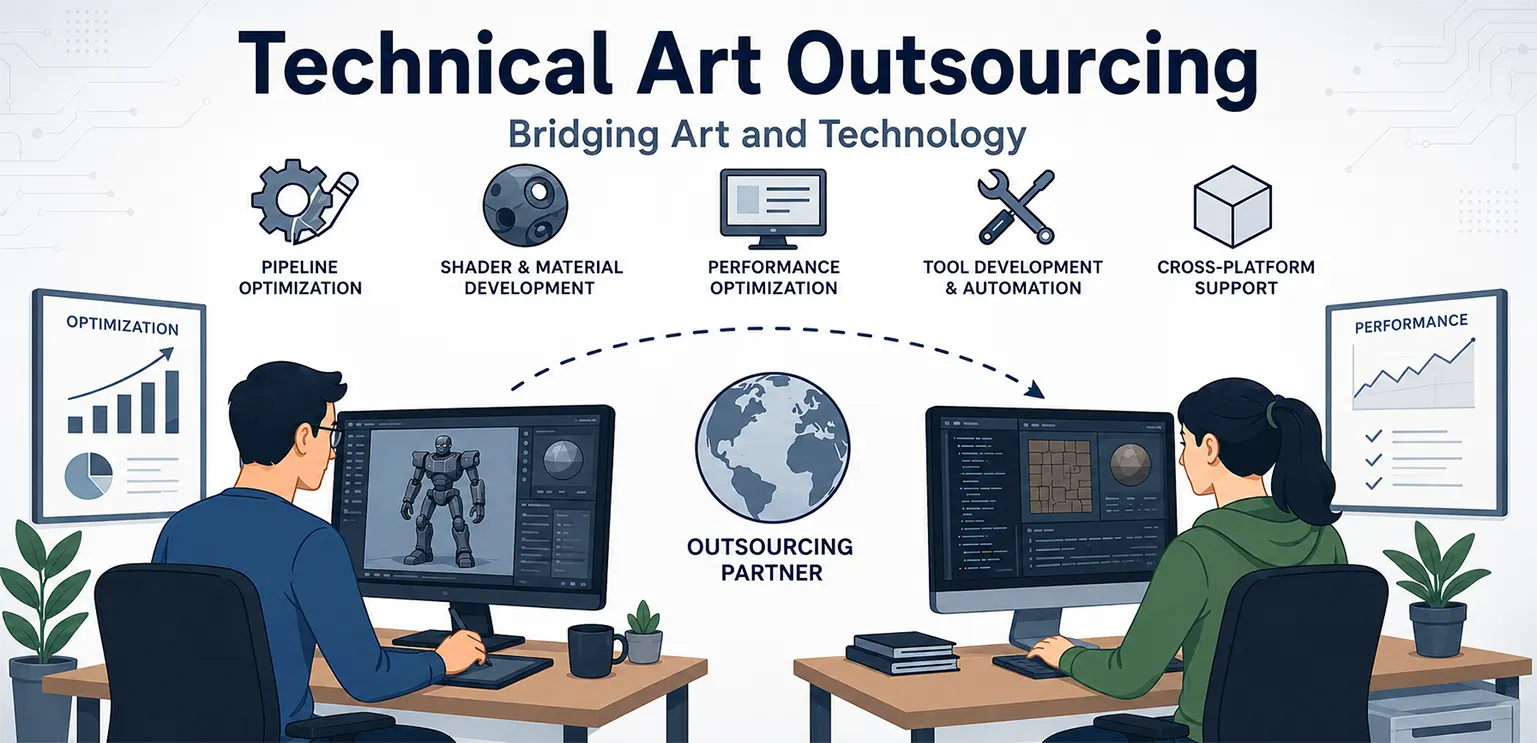
Game art outsourcing is evolving beyond simple asset production. Studios increasingly expect external partners to contribute at a higher strategic level, including:

  • Pipeline consultation
  • Technical art support
  • UI/UX implementation
  • Animation system integration
  • Live Ops content planning

Simultaneously, AI-assisted production tools are reshaping how outsourced teams operate, improving iteration speed while increasing demand for high-level artistic oversight. The future of outsourcing will be less about low-cost labor and more about specialized production partnership.


Strategic Takeaways for Studios

The rise of outsourced game art reflects a broader shift in how modern studios scale production. Outsourcing is no longer a fallback option. It is a deliberate operational strategy that allows studios to:

  • Increase output without expanding headcount
  • Access specialized talent on demand
  • Improve production flexibility
  • Keep internal teams focused on strategic work

Studios that build strong outsourcing pipelines gain a measurable production advantage over those relying solely on internal teams.


Conclusion

The growing demand for outsourced game art is not a temporary trend—it reflects the realities of modern game production. As games become more content-heavy and development cycles accelerate, studios need scalable production models that maintain quality without creating unsustainable overhead. Outsourced art partnerships provide exactly that.

When integrated properly, they improve efficiency, unlock specialist expertise, and help studios scale faster without sacrificing creative control. For many studios today, outsourcing is no longer just a smart option. It is becoming an essential part of competitive game development.


FAQ: Outsourced Game Art

Why do game studios outsource art?

Studios outsource art to scale production, access specialized talent, and improve efficiency without expanding internal teams.

Is outsourced game art lower quality than in-house art?

Not necessarily. Quality depends on the partner, pipeline integration, and production standards.

What types of game art are commonly outsourced?

Concept art, 2D/3D assets, UI/UX design, animation, VFX, slot symbols, promotional art, and Live Ops content.

Is outsourcing game art cost-effective?

Yes, when managed properly. It reduces overhead and improves cost-to-output efficiency.

What is the biggest challenge in outsourcing game art?

Maintaining consistent quality and pipeline alignment between internal and external teams.

How do studios choose the right art outsourcing partner?

They evaluate specialization, portfolio quality, communication processes, technical compatibility, and production reliability.

Git for Game Development: Advanced Workflows, LFS & Studio Best Practices

· 8 min read
Author - Gamix Labs

Git is widely considered the default version control system—but in game development, it’s also one of the most misunderstood tools. Many teams adopt Git assuming it will “just work” like it does in web or app development. Then reality hits.

Git for Game Development: Advanced Workflows, LFS & Studio Best Practices

Artists overwrite files. Unity scenes break. Repositories become slow. Merge conflicts start appearing in places no one expected. The problem isn’t Git itself. The problem is that game development is fundamentally different from traditional software development, and Git needs to be adapted accordingly.

This guide is not about basic Git commands. It’s about how real studios use Git in production—what works, what breaks, and how to design workflows that scale.


Industry Context: Why Version Control Is Harder in Games

Game development combines multiple disciplines into a single pipeline:

  • Programming
  • Art production
  • Animation
  • Audio
  • Design systems

Each of these introduces different types of files and workflows. Unlike code, most game assets are binary, meaning they cannot be merged line by line.

This creates a critical constraint:

Two people working on the same asset at the same time will almost always lead to conflict.

This is why version control in games is not just a technical system—it’s a production design problem. Studios that succeed don’t rely on Git alone. They design pipelines that reduce conflict before it happens.


Git in Game Development: What It Really Does

At a practical level, Git provides three core benefits to game teams:

  • It preserves history, allowing teams to roll back changes safely.
  • It enables parallel development through branching.
  • It creates a shared system where all disciplines can collaborate.

However, Git does not solve:

  • Asset conflicts
  • Large file performance
  • Poor team coordination

Those must be addressed through workflow design.


Setting Up Git for Game Projects (The Right Way)

🔹 Choosing a Platform That Supports Game Workflows

Most teams rely on platforms like GitHub or GitLab, but the choice is less important than how you configure them. For game teams, the key requirement is support for large files, automation, and access control.

🔹 Why Git LFS Is Non-Negotiable

Game projects quickly become heavy due to textures, models, animations, and audio. Using Git Large File Storage is essential. It prevents repositories from becoming bloated and keeps performance manageable. Without Git LFS, teams often experience:

  • Extremely slow cloning
  • Large repository sizes
  • Difficult collaboration

🔹 Unity Configuration: Where Most Teams Go Wrong

Unity projects require specific setup to work correctly with Git. The most critical settings include:

  • Enabling visible meta files
  • Forcing text serialization

These ensure that asset references remain consistent across machines.

When these are not configured, teams encounter issues like missing assets, broken prefabs, or duplicated references—problems that are often misdiagnosed as “Git issues” but are actually pipeline misconfigurations.


Real Workflow Design: How Studios Actually Use Git

🔹 Feature-Based Development

Most professional teams avoid working directly on the main branch. Instead, they use a structure where developers create isolated branches for each feature, then merge them after validation. This allows experimentation without risking the stability of the core build.

🔹 Why Simple Workflows Often Beat Complex Ones

While frameworks like GitFlow are popular, many game studios prefer simplified workflows. Game development involves frequent iteration, and overly complex branching strategies can slow teams down. In practice, many teams use:

  • A stable main branch
  • A development branch
  • Short-lived feature branches

The key is not complexity—it’s consistency.


Managing Art and Assets: The Real Challenge

This is where most Git implementations fail. Unlike code, assets cannot be merged easily. If two artists modify the same file, one version is usually lost. Studios address this problem through process, not tools.

They assign ownership of assets, ensuring that only one person works on a specific file at a time. They also structure projects so that assets are modular and independent.

For example, in slot game production, teams often break down visuals into reusable components—symbols, UI elements, animation layers. Studios like Gamix Labs design these assets in a way that minimizes overlap, making version control more manageable and reducing the likelihood of conflicts.

This is a critical insight:

Good asset design reduces version control problems.


Git vs Perforce: When Git Is Not Enough

One of the most important—and often ignored—discussions is whether Git is always the right choice. Git works extremely well for:

  • Small to mid-sized teams
  • Code-heavy projects
  • Modular asset pipelines

However, for large-scale productions with heavy binary assets, tools like Perforce Helix Core are often preferred. Perforce offers file locking, which prevents multiple users from editing the same asset simultaneously. This eliminates conflicts but introduces stricter workflows.

The decision between Git and Perforce should be based on:

  • Team size
  • Asset complexity
  • Production scale

Using Git without adapting workflows to its limitations is one of the most common mistakes studios make.


CI/CD Integration: Turning Git into a Production System

Git becomes significantly more powerful when integrated with CI/CD pipelines. Automation allows teams to:

  • Build the game automatically after commits
  • Run tests
  • Detect issues early

In Unity projects, this often involves triggering builds whenever changes are pushed to specific branches. This transforms Git from a storage system into a quality control mechanism.


Real Production Scenario: What Happens When Git Breaks

Consider a common scenario.

A Unity team is working on a feature update. Two developers modify the same scene file. Simultaneously, an artist updates related assets.

When changes are merged:

  • Scene references break
  • Prefabs lose connections
  • Unexpected bugs appear

This is not a rare edge case—it’s a frequent production issue.

Teams that handle this well typically:

  • Avoid simultaneous editing of critical files
  • Split scenes into smaller components
  • Use prefabs and modular structures

The lesson is clear:

Version control issues are often symptoms of deeper structural problems in the project.


Common Mistakes Game Studios Make with Git

Many issues arise not from Git itself, but from how teams use it.

One of the most common mistakes is committing large batches of changes infrequently. This makes it difficult to track issues and increases the risk of conflicts. Another problem is treating Git as a backup system rather than a collaboration tool.

Teams also often ignore onboarding. When team members use Git inconsistently, even well-designed workflows break down.


Best Practices for Scalable Git Workflows

Studios that successfully scale Git workflows focus on discipline and structure.

They keep commits small and meaningful, making it easier to track changes and debug issues. They also establish clear ownership of assets, reducing conflicts between team members.

Automation plays a key role. By integrating Git with build and testing systems, teams ensure that every change is validated before it reaches production.

Most importantly, they align Git workflows with their production pipelines, rather than forcing generic practices onto game development.


Version control systems are evolving to better support game workflows. We are seeing improvements in:

  • Large file handling
  • Cloud-based collaboration
  • Integration with development tools

Simultaneously, pipelines are becoming more interconnected. Version control is no longer isolated—it’s part of a larger system that includes CI/CD, Live Ops, and analytics. This means that mastering Git is not just about managing code—it’s about understanding how it fits into the entire production ecosystem.


Conclusion

Git is a powerful tool, but it is not a complete solution on its own. In game development, success depends on how well Git is integrated into your workflows, asset pipelines, and team structure. Studios that treat Git as a core production system—rather than just a tool—gain significant advantages in stability, collaboration, and scalability. Those that don’t often face the same recurring issues, regardless of project size.

The difference is not the tool.

It’s how you use it.


FAQs

Is Git suitable for game development?

Yes, especially for small to mid-sized teams, but it requires proper workflows and Git LFS for handling large assets.

What is Git LFS and why is it important?

Git LFS manages large files like textures and audio efficiently, preventing repositories from becoming slow and unmanageable.

How do game teams avoid asset conflicts in Git?

By assigning ownership, structuring assets modularly, and avoiding simultaneous edits on the same files.

Is Git better than Perforce for games?

Git is flexible and widely used, but Perforce is often better for large teams with heavy asset pipelines due to file locking.

How is Git used with Unity?

Unity projects use Git with meta files and text serialization to maintain asset references and prevent conflicts.

What is the biggest mistake teams make with Git?

Treating it as a backup tool instead of a structured collaboration system with defined workflows.

Concept Art vs Production Design in Game Studios

· 9 min read
Author - Gamix Labs

Most game studios do not struggle because of a lack of talent. They struggle because of pipeline misalignment. One of the most overlooked causes is the confusion between concept art and production design.

Concept Art vs Production Design: A Complete Guide for Game Studios

On the surface, both seem part of the same art process. But in reality, they serve completely different purposes. When this distinction is not clear, teams end up with stunning visuals that are impossible to scale or efficient assets that feel generic and forgettable.

In today’s market, where games are constantly updated, localized, and expanded, this gap becomes a serious production risk. Understanding how concept art and production design interact is no longer optional. It is a strategic requirement for building scalable, high-performing games.


Industry Context: Why This Matters More in Live Ops and Slot Games

Modern game development has shifted from one-time releases to continuous delivery. This is especially true in:

  • Mobile games
  • Social casino platforms
  • Slot games with frequent content drops

In these environments, art is not created once. It is produced repeatedly, often under tight deadlines. A single slot game theme might require:

  • 10 to 15 symbols
  • Multiple animation states
  • UI variations
  • Promotional assets

Now multiply that across multiple themes, markets, and seasonal updates. Concept art alone cannot support this scale. What studios need is a repeatable production system, and that is where production design becomes critical.


Concept Art: Defining Vision Without Constraints

Concept art is the starting point of visual development. It exists to explore ideas, push creative boundaries, and define the emotional tone of a game. At this stage, the goal is not efficiency. It is clarity of vision.

Concept artists focus on:

  • Mood, lighting, and atmosphere
  • Style exploration and variations
  • Visual storytelling
  • Thematic consistency

They answer questions like:

  • What makes this game visually unique?
  • What emotional response should players feel?
  • How do we differentiate from competitors?

Importantly, concept art operates without production constraints. It is intentionally ambitious.

A symbol in a slot game, for example, might be designed with layered lighting effects, intricate textures, and fine detail that looks perfect in a static image but may not yet be suitable for real-time rendering. That is not a flaw. That is the purpose.


Production Design: Turning Vision Into Scalable Systems

Production design begins where concept art ends. Its job is to translate creative ideas into assets that can be built, optimized, reused, and scaled. This is where constraints are introduced, not to limit creativity, but to make it viable.

Production design defines:

  • Asset dimensions and formats
  • Texture budgets and memory limits
  • Animation systems and states
  • UI consistency rules
  • Modular design frameworks

If concept art answers what should this look like, production design answers:

  • How will this be built?
  • How will it perform on target devices?
  • How quickly can we produce variations?
  • Can this system support future updates?

In a production environment, especially in Unity-based games, this often includes decisions like:

  • Using sprite atlases instead of individual textures
  • Limiting animation frames for performance
  • Standardizing symbol layouts across themes

These decisions directly impact cost, speed, and scalability.


The Real Difference: A Production Perspective

The difference between concept art and production design becomes clear when viewed through actual development workflows.

Concept art is about possibility. Production design is about repeatability.

Concept art is exploratory and often one-off. Production design is systematic and built for scale.

Concept art inspires the team. Production design aligns the team.

This distinction is not theoretical. It affects how teams allocate time, budget, and resources.


A Real Production Scenario: From Concept to Game Asset

Let us walk through a simplified but realistic pipeline example from a slot game project. A concept artist designs a premium symbol for a fantasy-themed slot. The design includes:

  • High-detail gold textures
  • Soft glow effects
  • Layered shadows and highlights

The image looks visually rich and defines the aesthetic direction.

When this moves into production, several transformations happen.

First, the asset is resized to fit a fixed grid system, often something like 512x512 or 1024x1024 depending on the game’s resolution strategy.

Next, lighting effects are simplified or baked into textures to reduce runtime cost. Instead of dynamic lighting, artists simulate depth using gradients and highlights.

Then the symbol is prepared for animation. Instead of continuous effects, it is broken into defined animation states such as idle, win, and highlight, each with controlled frame counts.

Finally, the asset is packed into a sprite atlas for efficient rendering in the engine.

What started as a visually rich concept becomes a performance-optimized, reusable asset.

Studios with mature pipelines, such as teams like Gamix Labs, approach this transformation systematically. They ensure that the essence of the concept is preserved while aligning with production realities like memory budgets and animation constraints. This is where production design proves its value.


Where Studios Go Wrong

Even experienced teams make mistakes when these roles are not clearly separated.

One common issue is over-investing in concept art without validating production feasibility. This leads to rework when assets cannot be implemented efficiently. Another problem is skipping proper production design altogether. Teams jump directly from concept to asset creation without defining systems. The result is inconsistency across assets and slower production over time.

There is also the risk of introducing constraints too early. If production limitations dominate during the concept phase, the final visuals often feel generic and fail to stand out in a competitive market. These issues are not minor. They directly affect timelines, costs, and player perception.


Pipeline Thinking: How Work Should Flow

High-performing studios treat concept art and production design as connected stages within a structured pipeline. The flow typically looks like this:

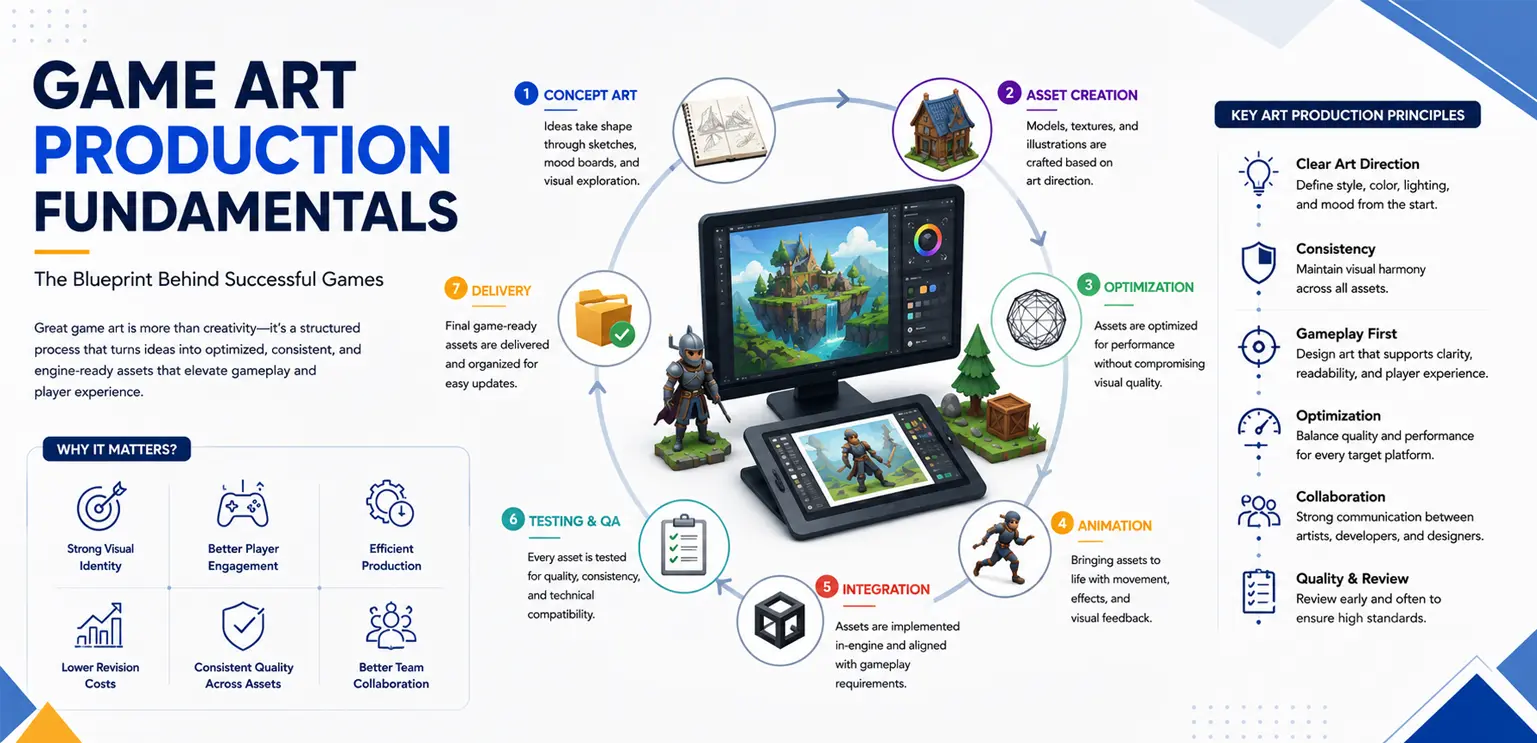
  1. Concept exploration defines the visual direction.
  2. This is followed by style guides that lock key visual rules.
  3. Production design then translates these into technical specifications.
  4. Assets are created based on these specifications.
  5. Finally, assets are integrated, tested, and optimized in the engine.

This pipeline ensures that creativity is preserved while maintaining production efficiency. The key is not to isolate these stages, but to create feedback loops between them. If production constraints require changes, those insights should inform future concepts.


Decision Framework: When to Prioritize Each

Studios often ask where they should invest more, concept art or production design.

The answer depends on the project stage and goals.

During early development or when creating a new IP, concept art should take priority. This is where differentiation happens.

During scaling phases, such as Live Ops or multi-theme slot production- production design becomes more critical. Efficiency and consistency matter more than exploration.

For most successful studios, the balance shifts over time. Early stages are concept-heavy. Later stages become production-driven. Recognizing this shift is essential for resource planning.


Technical Depth: Why Production Design Impacts Performance

Production design is not just about workflow. It directly affects technical performance.

Poorly optimized assets can increase memory usage, slow down rendering, and cause frame drops, especially on mobile devices.

For example, using multiple high-resolution textures instead of a single atlas increases draw calls. Overly complex animations can impact CPU and GPU performance.

Production design ensures that assets are built within defined budgets. It aligns art decisions with engine capabilities, particularly in environments like Unity where optimization is critical. This is why production design often involves technical artists who understand both art and engineering constraints.


Best Practices for Studios

Studios that consistently deliver high-quality games at scale follow a few core principles.

They involve production designers early in the concept phase, not to limit creativity, but to guide feasibility. They document everything clearly, from style guides to asset specifications, reducing ambiguity across teams.

They also design assets with reuse in mind. Instead of creating everything from scratch, they build systems that support variations and extensions. Most importantly, they treat concept art and production design as equal contributors to the final product.


As tools evolve, the relationship between concept art and production design is becoming more integrated.

Real-time engines allow artists to test ideas directly in-game. AI tools are accelerating concept exploration. Procedural systems are enabling scalable asset generation.

However, these advancements do not eliminate the need for structure. If anything, they increase the importance of having a clear pipeline. Faster tools can amplify inefficiencies just as easily as they improve productivity. Studios that succeed will be those that combine creativity with strong production systems.


Conclusion

Concept art and production design are not interchangeable. They are interdependent. Concept art defines the vision. Production design makes that vision possible at scale.

For studios working in fast-paced, content-heavy environments like slot games and mobile platforms, this distinction is critical. Because the real challenge is not just creating great visuals.

It is creating them consistently, efficiently, and in a way that supports long-term growth.


Frequently Asked Questions

What is the main difference between concept art and production design?

Concept art focuses on visual exploration and defining style, while production design focuses on creating scalable, production-ready assets.

Can concept art be directly used in games?

No. Concept art usually needs to be adapted to meet technical constraints like performance, resolution, and animation systems.

Why is production design important in slot games?

Slot games require repeated asset creation across themes, making scalability and consistency essential for efficient production.

Who is responsible for production design in a studio?

Production design is typically handled by technical artists, art leads, or dedicated production designers.

How do studios balance creativity and technical constraints?

By involving production designers early and maintaining collaboration between concept artists and development teams.

When should studios focus more on concept art?

During early stages or when developing a new visual identity or IP.

When does production design become more important?

During scaling phases, Live Ops updates, and when producing large volumes of content efficiently.

Pay-to-Play vs Play-to-Earn Games: Key Differences Explained

· 7 min read
Author - Gamix Labs

From premium titles to free-to-play systems, each model defines not just how revenue is generated—but how players engage, progress, and stay invested. Today, the industry is seeing a sharp contrast between two models that operate on fundamentally different philosophies: pay-to-play (P2P) and play-to-earn (P2E).

Pay-to-Play vs Play-to-Earn Games

At a surface level, the difference seems simple. Players either pay to play—or they play to earn.

But in reality, the distinction runs much deeper. These models influence everything from game economy design and player psychology to long-term sustainability and production strategy. For developers, especially those in casino, mobile, and emerging blockchain spaces, understanding this difference is critical.


Industry Context: Why This Debate Matters Now

The rise of blockchain-based gaming introduced the idea that players could earn real-world value through gameplay. This challenged traditional monetization models, particularly in segments like online casinos and mobile games, where revenue typically flows from players to operators. However, while P2E gained rapid attention, many implementations struggled with sustainability. Simultaneously, traditional pay-to-play and related models (including real-money gaming in casinos) continued to dominate in terms of revenue and scalability.

This creates an important question for studios: Should we stick with proven monetization models, or experiment with player-driven economies? The answer depends on understanding how these systems actually work.


What Are Pay-to-Play Games?

Pay-to-play games require players to spend money to access gameplay or features. In traditional gaming, this might mean purchasing the game upfront. In casino environments, it often means wagering real money to participate. The defining characteristic is simple:

Players pay for access, entertainment, or the chance to win.

Revenue is directly tied to player spending, making the model predictable and scalable. In slot games, for example, players pay per spin, and the game’s design—RTP, volatility, and features—determines the overall experience.


What Are Play-to-Earn Games?

Play-to-earn games are built around the idea that players can earn rewards with real-world value through gameplay. These rewards are often tied to:

  • Cryptocurrencies
  • Tokens
  • NFTs or digital assets

Instead of players paying purely for entertainment, they are participating in an economic system where time and skill can generate value. This shifts the player mindset from consumer to participant.


Core Differences Between Pay-to-Play and Play-to-Earn

The most important differences are not just financial—they are structural.

🔹 Revenue Flow

In pay-to-play systems, money flows from players to the operator. In play-to-earn systems, value flows both ways. Players can extract value, which means the system must sustain continuous economic balance. This creates a major design challenge in P2E: ensuring that rewards do not exceed the system’s ability to generate value.

🔹 Player Motivation

Player intent is fundamentally different. In pay-to-play games, players are primarily motivated by entertainment, excitement, and experience. In play-to-earn games, financial incentives play a significant role. Players may engage not because the game is fun—but because it is profitable. This can impact gameplay behavior, often leading to optimization rather than exploration.

🔹 Game Economy Design

Pay-to-play economies are relatively controlled. Developers define:

  • Pricing
  • Rewards
  • Progression

In play-to-earn systems, economies are more complex and often influenced by external factors such as token markets. This introduces volatility and unpredictability.

🔹 Retention Mechanics

Retention in pay-to-play games is driven by:

  • Engaging gameplay loops
  • Reward systems
  • Live Ops updates

In play-to-earn games, retention is often tied to earning potential. If rewards decrease, player engagement can drop rapidly.

🔹 Regulatory and Compliance Factors

Casino and pay-to-play games operate within well-defined regulatory frameworks. Play-to-earn games, especially those involving blockchain, often exist in a more uncertain regulatory environment. This creates additional risks for developers and operators.


Real-World Application: Slot Games vs Blockchain-Based Games

Slot games represent one of the most refined examples of pay-to-play systems. They are built around carefully balanced mechanics, including:

  • RTP (Return to Player)
  • Volatility
  • Feature frequency

These systems are designed to deliver consistent engagement while maintaining profitability.

In contrast, many P2E games rely on token-based economies. If the token loses value, the entire system can collapse, regardless of gameplay quality. This highlights a key difference:

Pay-to-play games are experience-driven, while play-to-earn games are often economy-driven.


Production Impact: How These Models Affect Game Development

The monetization model directly influences how games are built.

🔹 In pay-to-play systems, development focuses on:

  • Gameplay quality
  • Visual and audio polish
  • Retention systems

🔹 In play-to-earn systems, additional layers are required, including:

  • Tokenomics design
  • Blockchain integration
  • Marketplace systems

This increases development complexity significantly. Studios working on slot pipelines often prioritize efficiency and scalability. For example, teams like Gamix Labs focus on creating reusable art and animation systems that support rapid content updates—an approach that aligns well with pay-to-play and Live Ops-driven models.


Challenges and Risks

Both models come with challenges. Pay-to-play games must continuously justify player spending. Poor design or lack of innovation can lead to churn. Play-to-earn games face sustainability issues. If the economic model is not balanced, the system can become unsustainable. There is also the risk of misaligned incentives. When players focus purely on earning, gameplay quality can suffer.


Best Practices for Choosing the Right Model

Studios should not choose a model based on trends alone. Instead, they should consider:

  • Target audience
  • Game type
  • Long-term sustainability
  • Regulatory environment

Often, hybrid models are emerging, combining elements of both systems. However, these require careful design to avoid conflicts between entertainment and earning incentives.


The future is unlikely to be purely pay-to-play or purely play-to-earn. We are already seeing the rise of hybrid systems that blend:

  • Entertainment-driven gameplay
  • Optional earning mechanisms

These models aim to capture the strengths of both approaches while minimizing weaknesses. However, achieving this balance is complex and requires deep expertise in both game design and economic systems.


Conclusion

Pay-to-play and play-to-earn games represent two fundamentally different approaches to game design and monetization. One prioritizes controlled systems and entertainment-driven engagement. The other introduces player-driven economies and financial incentives.

For game studios, the choice is not just about revenue—it’s about defining the entire structure of the game. Understanding these differences is essential for building sustainable, engaging, and scalable products in today’s evolving gaming landscape.


Frequently Asked Questions

What is the main difference between pay-to-play and play-to-earn games?

Pay-to-play games require players to spend money to access gameplay, while play-to-earn games allow players to earn real-world value through gameplay.

Are play-to-earn games sustainable?

Sustainability depends on economic design. Many P2E systems struggle if rewards exceed incoming value.

Which model is better for game studios?

It depends on the game type and target audience. Pay-to-play is more stable, while P2E offers experimental opportunities.

Can casino games use play-to-earn mechanics?

Some elements can be adapted, but regulatory constraints often limit full P2E implementation.

Do players prefer earning over entertainment?

Not always. While earning is attractive, long-term engagement still depends on gameplay quality.

What are hybrid game models?

Hybrid models combine traditional gameplay with earning opportunities, aiming to balance engagement and monetization.

The Rise of AI-Composed Game Music: Tools, Trends & What’s Next

· 9 min read
Author - Gamix Labs

For years, music in games was treated as a fixed asset—composed, exported, and looped. Today, that model is being replaced by something far more dynamic: intelligent, system-driven audio powered by AI. This change is not just about efficiency. It’s about how music behaves inside a game.

The Rise of AI-Composed Game Music

Instead of asking composers to deliver dozens of variations manually, studios are now exploring ways to generate, adapt, and scale music in real time. For teams working on mobile titles, live-service games, and slot experiences, this is becoming increasingly relevant.

The real transformation is this: Music is no longer just created—it’s generated, controlled, and evolved as part of gameplay systems.


Industry Context: Why AI Music Is Becoming a Production Tool

The adoption of AI-composed music is driven by production realities rather than experimentation. Modern game pipelines demand:

  • Rapid iteration
  • Continuous content updates
  • Scalable asset production
  • Shorter release cycles

Traditional audio workflows struggle to keep up, especially when games require frequent updates or multiple variations of similar content.

AI music tools are stepping in to fill this gap—not by replacing composers, but by enabling teams to prototype faster, scale content, and reduce repetitive work.

This is particularly valuable in segments like slot games, where repetition is unavoidable and variation is critical to retention.


Leading AI Music Tools Used in Game Development

AI music is no longer theoretical. Several tools are already being used in production workflows, each serving slightly different purposes. For example:

🔹 AIVA

AIVA is widely used for generating cinematic-style compositions and structured musical pieces. It’s particularly useful when teams need a strong thematic base quickly.

🔹 Soundraw

Soundraw focuses on customization and variation. Developers can adjust mood, tempo, and structure, making it useful for creating multiple versions of a track without starting from scratch.

🔹 Amper Music

Amper Music (now part of Shutterstock) has historically been used for generating royalty-free music tailored to specific use cases, including games and media.

🔹 Boomy

Boomy allows rapid generation of music loops, which can be useful during prototyping or for lightweight mobile experiences.

More advanced workflows are beginning to integrate tools like OpenAI Jukebox for experimental or research-driven applications, although these are not yet standard in production pipelines.

The key takeaway is that studios are not relying on a single tool. Instead, they are combining these systems based on:

  • Project scope
  • Required quality level
  • Production timelines

From Tracks to Systems: The Real Shift in Audio Design

The most important change AI introduces is not faster composition—it’s a shift in how music is structured.

Traditional workflows rely on switching between pre-made tracks. AI enables a more fluid approach, where music evolves continuously based on gameplay.

For example, instead of jumping from a “normal” track to a “bonus” track, a system might gradually introduce new layers, increase tempo, or modify instrumentation in response to player actions.

This creates a smoother, more immersive experience and reduces the jarring transitions that often break immersion.

In practice, this means music is no longer treated as a static file but as a set of controllable parameters—intensity, rhythm, layering—that can be adjusted in real time.


How AI Music Fits into Real Game Pipelines

Despite the hype, AI music does not replace existing audio systems. It integrates into them.

In most professional pipelines, AI-generated outputs are still routed through middleware like FMOD or Wwise. These systems handle event triggers, transitions, and parameter control.

The difference is that instead of feeding these systems with fixed audio files, teams can now feed them with:

  • Generated loops
  • Modular stems
  • Multiple variations of the same theme

In a Unity-based workflow, a typical implementation might involve triggering an audio event tied to gameplay while passing parameters such as player progress or win intensity. Middleware then uses these parameters to adjust playback dynamically, sometimes combining AI-generated elements with pre-designed layers.

This hybrid approach allows studios to maintain control while benefiting from AI-driven scalability.


Use Cases Where AI Music Delivers Real Value

AI-composed music is not universally necessary, but it excels in specific scenarios.

In Live Ops environments, where games require frequent updates, AI tools allow teams to generate seasonal or event-based variations quickly. Instead of composing entirely new tracks, developers can create variations that maintain consistency while adding freshness.

In slot games, AI can help reduce repetition by introducing subtle variations in win sequences, background loops, or bonus features. Given how frequently players interact with these systems, even small variations can significantly improve perceived quality.

Studios working on production pipelines—particularly those managing both visuals and audio—are increasingly aligning animation timing with dynamic audio systems. In such setups, partners like Gamix Labs often ensure that visual feedback systems are designed in a way that can support adaptive audio layers, creating a more cohesive player experience.

AI is also highly effective during prototyping. Teams can generate placeholder music quickly, test gameplay pacing, and refine systems before committing to final compositions.


Technical Constraints: Why AI Doesn’t Remove Complexity

A common misconception is that AI simplifies audio production entirely. In reality, it shifts complexity rather than removing it.

Generated audio still needs to meet performance requirements. File sizes must be optimized, especially for mobile and instant-playable games. Compression techniques and streaming strategies remain critical.

There is also the challenge of consistency. AI-generated outputs can vary in quality and style, which means teams must implement validation and filtering processes to ensure alignment with the game’s audio identity.

Latency and synchronization are equally important. Dynamic systems must respond instantly to gameplay events, or they risk breaking immersion. This requires careful integration with game logic and testing across devices.


Measuring Impact: Does AI Music Improve Game Performance?

While AI music is still evolving, early implementations suggest measurable benefits when used correctly.

Games that introduce dynamic variation tend to see improvements in session length because the experience feels less repetitive. In slot environments, extended and adaptive win sequences can increase perceived reward value, even when the underlying math remains unchanged.

However, these gains depend heavily on implementation. Poorly designed systems can feel inconsistent or disjointed, which negatively impacts player experience.

This reinforces an important point: AI is not a shortcut to better audio—it’s a tool that amplifies the quality of your system design.


Where AI Still Falls Short

Despite its advantages, AI-generated music has limitations.

It often lacks the intentional storytelling and emotional nuance that experienced composers bring. While it can generate variations, it may struggle to create truly memorable themes.

There are also unresolved legal and licensing questions around training data and ownership, which studios must consider before adopting AI tools at scale.

For this reason, most successful implementations use AI as a support system, not a replacement.


The next phase of AI in game music will focus on deeper integration.

We are likely to see more systems where music is generated in real time based on player behavior, creating highly personalized experiences. Adaptive soundtracks will become more granular, responding not just to game states but to subtle gameplay patterns.

Another key trend is cross-discipline integration. Audio systems will become more tightly connected with animation, UI, and gameplay mechanics, creating unified feedback systems rather than separate layers.

As tools mature, the barrier to entry will decrease, allowing smaller studios to experiment with dynamic audio systems that were previously resource-intensive.


Strategic Takeaway for Game Studios

The most important decision for studios is not whether to use AI music—but how to integrate it effectively. Teams that benefit the most are those that:

  • Use AI for variation and scalability
  • Maintain human control over creative direction
  • Integrate AI into structured pipelines

AI should be seen as a production multiplier, not a creative replacement.


Conclusion

AI-composed game music represents a shift from static assets to dynamic systems.

It allows studios to scale audio production, reduce repetition, and create more responsive experiences. But its true value lies in how well it is integrated into gameplay and design systems.

The future of game audio is not purely human or purely AI-driven.

It is a hybrid model—where human creativity defines the vision, and AI helps bring it to life at scale.


FAQ: AI-Composed Game Music

What are the best AI tools for game music?

Popular tools include AIVA, Soundraw, Amper Music, and Boomy, each offering different strengths in composition, customization, and scalability.

Can AI-generated music be used in commercial games?

Yes, but developers must review licensing terms and ensure compliance with usage rights.

Does AI replace game composers?

No. AI supports composers by generating variations and speeding up workflows, but creative direction still relies on humans.

How is AI music implemented in games?

It is typically integrated through middleware like FMOD or Wwise, allowing dynamic control based on gameplay events.

Is AI music suitable for slot games?

Yes. It helps reduce repetition and create dynamic audio systems that improve engagement.

What is the biggest challenge with AI music?

Maintaining consistency and ensuring that generated content aligns with the game’s artistic vision.