AI Audio Implementation Guide for Unity (Step-by-Step)
Most teams approach AI-generated music the wrong way. They experiment with tools, generate a few tracks, and try to drop them into Unity like traditional audio files. The result is usually underwhelming—because AI audio is not just about generation, it’s about system design.
In modern game production, especially for mobile, live-service, and slot games, audio must be:
- Adaptive
- Scalable
- Performance-friendly
- Tightly integrated with gameplay This is where AI can add real value—but only when implemented correctly.
This guide breaks down how experienced game teams actually integrate AI-generated audio into Unity pipelines, moving from simple experiments to production-ready systems.
Industry Context: Why Unity Projects Are Moving Toward AI Audio
Unity-based projects often face constraints that make traditional audio workflows inefficient. These include:
- Limited build size budgets
- High content variation requirements
- Rapid iteration cycles
- Live Ops demands
AI audio helps address these challenges by enabling:
- Procedural variation without storing multiple files
- Faster prototyping and iteration
- Dynamic audio systems that respond to gameplay
However, Unity alone is not enough. Real implementation requires combining:
- AI music tools
- Audio middleware
- Runtime parameter systems
Core Architecture: How AI Audio Fits into Unity
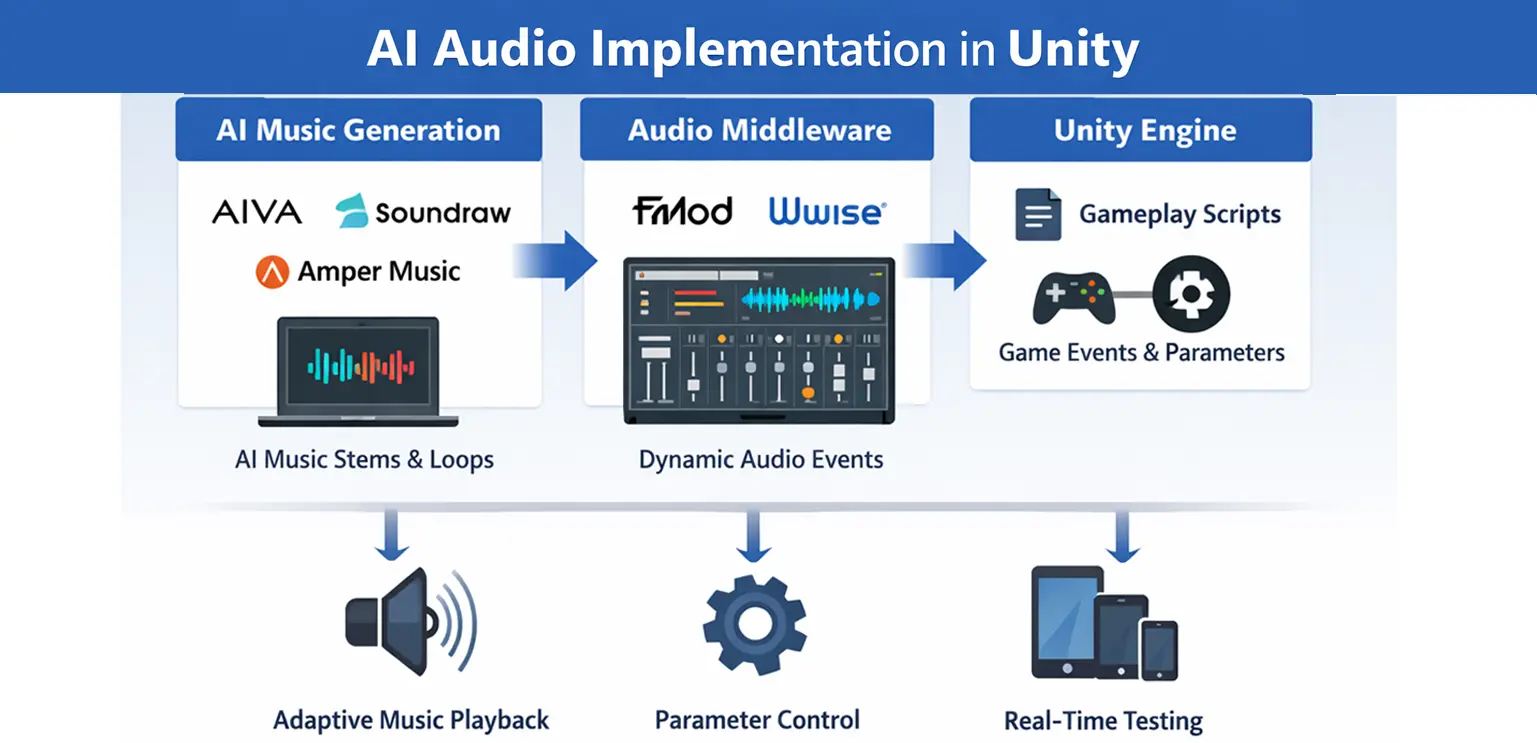
Before jumping into steps, it’s important to understand the architecture. A typical AI audio pipeline in Unity comprises three layers:
-
AI Music Generation Layer
Tools like AIVA or Soundraw generate base music, loops, or stems. -
Audio Middleware Layer
Systems like FMOD or Wwise manage playback, transitions, and real-time parameter control. -
Unity Gameplay Layer
Unity scripts send gameplay data (e.g., intensity, state, win level) to middleware, which adjusts the audio dynamically. This layered approach ensures flexibility, scalability, and control.
Step-by-Step Implementation Workflow
Step 1: Define Audio Design Goals First (Not Tools)
Before generating anything, define: What should the music react to? How many gameplay states exist? Do you need smooth transitions or hard switches?
For example, in a slot game, your system might respond to:
- Base spin
- Near win
- Bonus trigger
- Big win Without this clarity, AI-generated audio becomes noise rather than a system.
Step 2: Generate Modular Audio Instead of Full Tracks
Using tools like AIVA or Soundraw, avoid exporting long, fixed tracks. Instead, generate:
- Loops (background layers)
- Stems (drums, melody, bass separately)
- Short transition cues This modular approach allows middleware to dynamically combine elements.
For instance, instead of one “big win” track, you create:
- Base loop
- Intensity layer
- High-energy overlay These can then be triggered and blended in real time.
Step 3: Prepare Audio for Game Integration
Raw AI output is rarely production-ready. You need to:
- Normalize volume levels
- Trim silence
- Ensure seamless looping
- Compress files for mobile For Unity projects, formats like OGG are typically preferred due to size efficiency. This step is critical—poorly prepared audio will break immersion, no matter how advanced your system is.
Step 4: Import into Middleware (FMOD or Wwise)
Once assets are ready, import them into FMOD or Wwise. Here’s where the real system design begins. Instead of assigning a single track, you:
- Create events
- Layer multiple audio tracks
- Define parameters (e.g., intensity = 0 to 100)
For example, you might design: Layer 1: base ambient loop Layer 2: rhythmic intensity Layer 3: high-energy effects Each layer activates based on parameter values.
Step 5: Design Adaptive Logic Using Parameters
This is the heart of AI audio implementation. You define how music changes based on gameplay variables. In FMOD or Wwise, you can:
- Increase tempo as intensity rises
- Introduce new instruments during key events
- Fade layers smoothly
For example: Intensity = 0 → calm background Intensity = 50 → add rhythm Intensity = 100 → full energy + effects This replaces hard track switching with smooth evolution.
Step 6: Connect Middleware to Unity
Now integrate with Unity using official plugins. In your Unity scripts, you send real-time data:
FMODUnity.RuntimeManager.StudioSystem.setParameterByName("Intensity", value);
This allows gameplay systems to control audio dynamically.
For example: Player wins → increase intensity Bonus triggered → activate special layer Idle state → reduce complexity This creates a direct link between gameplay and audio behavior.
Step 7: Sync Audio with Game Events and Animation
AI audio systems are most effective when synchronized with visual feedback. In slot games, this means aligning:
- Reel spin speed
- Symbol animations
- Win effects Studios working on integrated pipelines, such as Gamix Labs, often design visual assets (symbols, UI animations) in a way that supports layered audio systems. This ensures that audio and visuals scale together, rather than feeling disconnected.
Step 8: Optimize for Performance and Build Size
AI audio systems can increase complexity, so optimization is critical. Focus on:
- Limiting simultaneous layers
- Using compressed formats
- Streaming longer audio instead of loading into memory For instant-playable games, keeping audio lightweight is essential to maintain fast load times.
Step 9: Test Across Devices and Scenarios
Dynamic systems behave differently under different conditions. Test for:
- Latency in transitions
- Abrupt audio changes
- Performance drops on low-end devices Also test edge cases, such as rapid state changes, to ensure the system remains stable.
Common Mistakes Studios Make
Many teams struggle not because of tools, but because of approach. One common mistake is treating AI audio like traditional audio—exporting full tracks and expecting dynamic results. Another issue is over complicating systems. Too many layers or parameters can make audio feel chaotic instead of immersive. Some teams also ignore performance early, leading to heavy builds that are difficult to optimize later.
Best Practices for Production-Ready AI Audio
Successful implementations share a few key principles. They keep systems simple but flexible, using a limited number of well-designed layers instead of dozens of variations. They also ensure strong collaboration between audio designers, developers, and gameplay designers. AI audio is not just an audio feature—it’s a system that touches multiple disciplines. Most importantly, they treat AI as a tool for variation and scalability, not as a replacement for creative direction.
Future Direction: Real-Time and Personalized Audio
Looking ahead, AI audio systems will become more advanced. We are moving toward:
- Real-time music generation during gameplay
- Player-specific audio adaptation
- Deeper integration with AI-driven gameplay systems Unity’s evolving ecosystem, combined with improvements in AI tools, will make these systems more accessible—even for mid-sized studios.
Conclusion
Implementing AI audio in Unity is not about plugging in a tool—it’s about designing a system. When done correctly, it allows studios to:
- Scale audio production
- Reduce repetition
- Create more immersive experiences But success depends on structure, not experimentation. Studios that approach AI audio with clear design goals, modular assets, and strong middleware integration will unlock its real potential.
FAQs
How do you use AI-generated music in Unity?
AI-generated music is integrated through middleware like FMOD or Wwise, allowing dynamic control via gameplay parameters.
What are the best AI tools for Unity audio?
AIVA and Soundraw are commonly used for generating music, while FMOD and Wwise handle implementation and runtime control.
Can Unity handle adaptive audio systems?
Yes. With middleware integration, Unity can support complex adaptive audio systems driven by real-time gameplay data.
Is AI audio suitable for mobile games?
Yes, but it must be optimized for performance and file size to avoid impacting load times and memory usage.
Does AI replace traditional sound design?
No. AI enhances workflows but still requires human design, direction, and system integration.
What is the biggest challenge in AI audio implementation?
Designing a coherent system that balances flexibility, performance, and artistic consistency.