Why Game Performance Testing Matters
A game can have beautiful visuals, engaging mechanics, and carefully designed animations, yet still frustrate players if it runs poorly. Frame drops, slow loading, unexpected crashes, and unresponsive controls can interrupt gameplay even when the underlying design is strong.
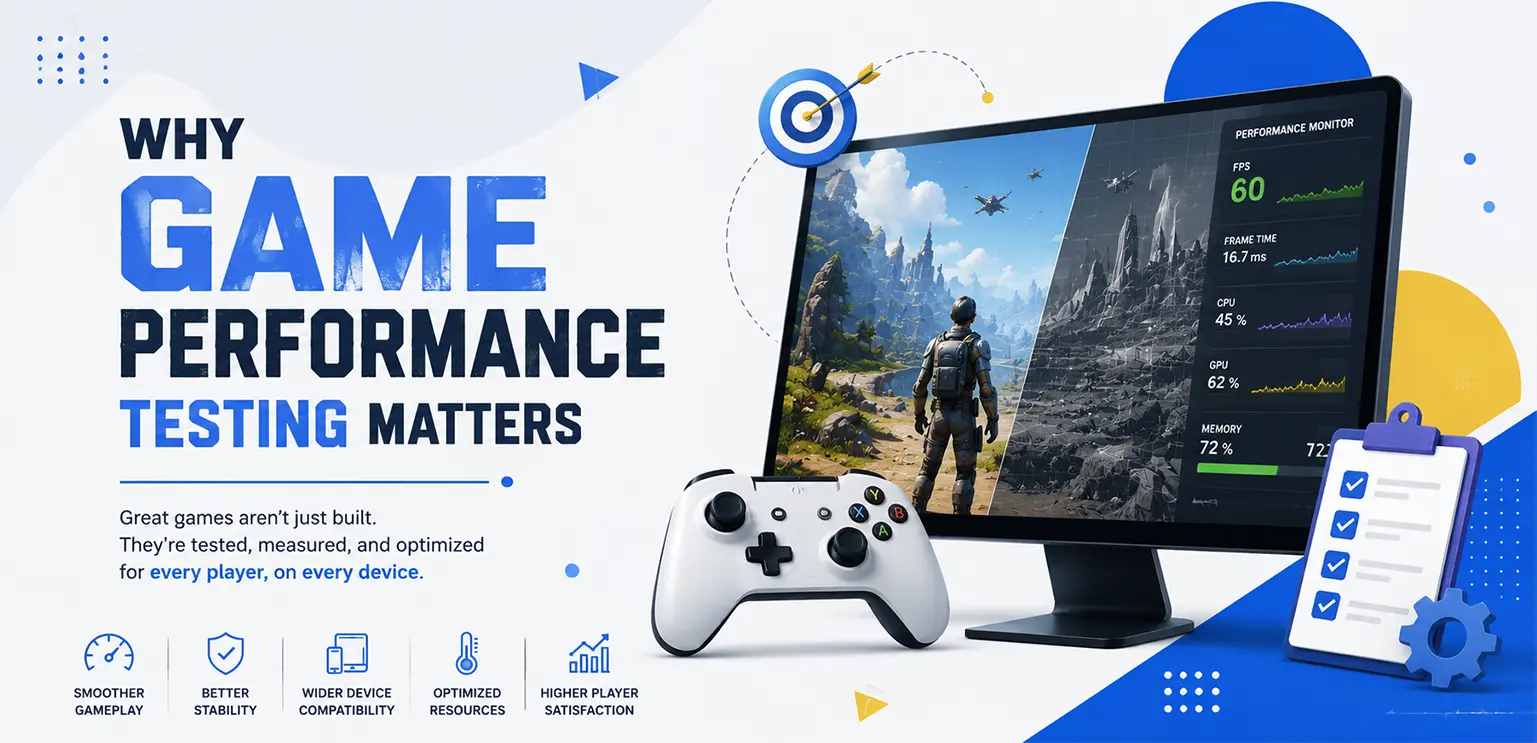
That is why game performance testing matters. It helps development teams measure how a game behaves under real operating conditions, identify technical bottlenecks, and verify that performance meets the requirements of its target platforms.
Rather than waiting until the final stages of development, teams should evaluate performance throughout production. Testing early makes it easier to identify problems before new features, visual effects, and code changes make them harder to isolate.
What Is Game Performance Testing?
Game performance testing is the process of measuring how efficiently and reliably a game runs under defined conditions. It evaluates factors such as frame rate, frame time, memory usage, loading speed, CPU and GPU utilization, stability, and responsiveness.
The goal is to determine whether the game meets its performance requirements across its intended devices, platforms, and gameplay scenarios.
For example, a mobile game might run smoothly during its opening scene but experience frame drops when several animated characters, particle effects, and interface transitions appear together. Performance testing helps developers reproduce that situation, measure its impact, and identify the underlying cause.
Performance testing is related to game QA, but the two are not interchangeable. Functional testing checks whether a feature behaves correctly; performance testing examines how efficiently that feature operates.
Why Does Performance Testing Matter in Game Development?
It helps deliver smoother gameplay
Players notice when movement becomes uneven, animations stutter, or input responses feel delayed. These issues can make an otherwise well-designed game feel unreliable.
Performance testing helps developers measure frame delivery and identify the scenes or actions that cause slowdowns. Instead of relying only on subjective impressions, the team can compare observed results against an agreed performance target.
For instance, a team targeting 60 frames per second can use a frame-time budget of approximately 16.67 milliseconds per frame as an initial reference. If frames regularly take longer than that, the game may struggle to maintain its target rate.
The actual target should reflect the game, device, display, and platform requirements.
It reveals bottlenecks before release
Performance problems can originate in many parts of a game, including scripts, rendering, physics, asset loading, memory allocation, and visual effects.
A scene with too many draw calls may put pressure on rendering. Expensive calculations may overload the CPU. Large textures or repeated allocations may increase memory pressure. Each problem requires a different response.
Profiling gives developers evidence about where time and resources are being spent. This helps teams prioritize changes that address the actual bottleneck instead of optimizing code or assets based on guesswork.
Unity's profiling guidance recommends establishing a baseline, profiling during development, and measuring again after changes to verify the result.
It improves compatibility across devices
A game that performs well on a high-end development machine may struggle on a lower-specification mobile phone or another supported device.
Differences in CPU and GPU capabilities, available memory, display resolution, operating-system behavior, and thermal limits can change how a game runs.
Testing across a representative range of target devices helps teams understand these differences. It can also reveal whether graphics settings, asset quality, or effect complexity need to be adjusted for different hardware categories.
This is especially important for mobile games, where sustained performance, heat, and battery consumption can affect the experience.
It helps prevent crashes and instability
Performance problems are not limited to low frame rates. Memory leaks, excessive resource consumption, and long-running tasks can cause a game to become unstable over time.
A short playtest might not expose these issues. A longer session can reveal gradually increasing memory usage, repeated loading delays, or failures that occur only after several gameplay cycles.
Endurance testing helps teams investigate these patterns before release and determine whether performance remains within acceptable limits during extended use.
It reduces the risk of performance regressions
A performance regression occurs when a change makes an existing part of a game run worse.
A new animation, UI transition, shader, particle system, or gameplay feature may introduce extra rendering work or memory allocations. The change might appear correct during a functional check while quietly affecting frame time.
Performance regression testing compares a new build with an established baseline. It helps teams detect unintended slowdowns after code updates, content additions, engine changes, or optimization work.
This makes performance a continuous quality requirement rather than a final release checklist item.
It supports a more consistent player experience
A responsive interface and stable frame delivery help players interact with a game without unnecessary interruptions.
In a browser-based game, for example, a delayed transition between screens can make the experience feel sluggish. In a mobile game, sustained heavy processing may cause the device to heat. In an animation-heavy game, poorly managed effects may interrupt otherwise smooth sequences.
Testing helps teams identify and address these problems systematically. It cannot guarantee that every player will have an identical experience, but it provides evidence for improving consistency across supported environments.
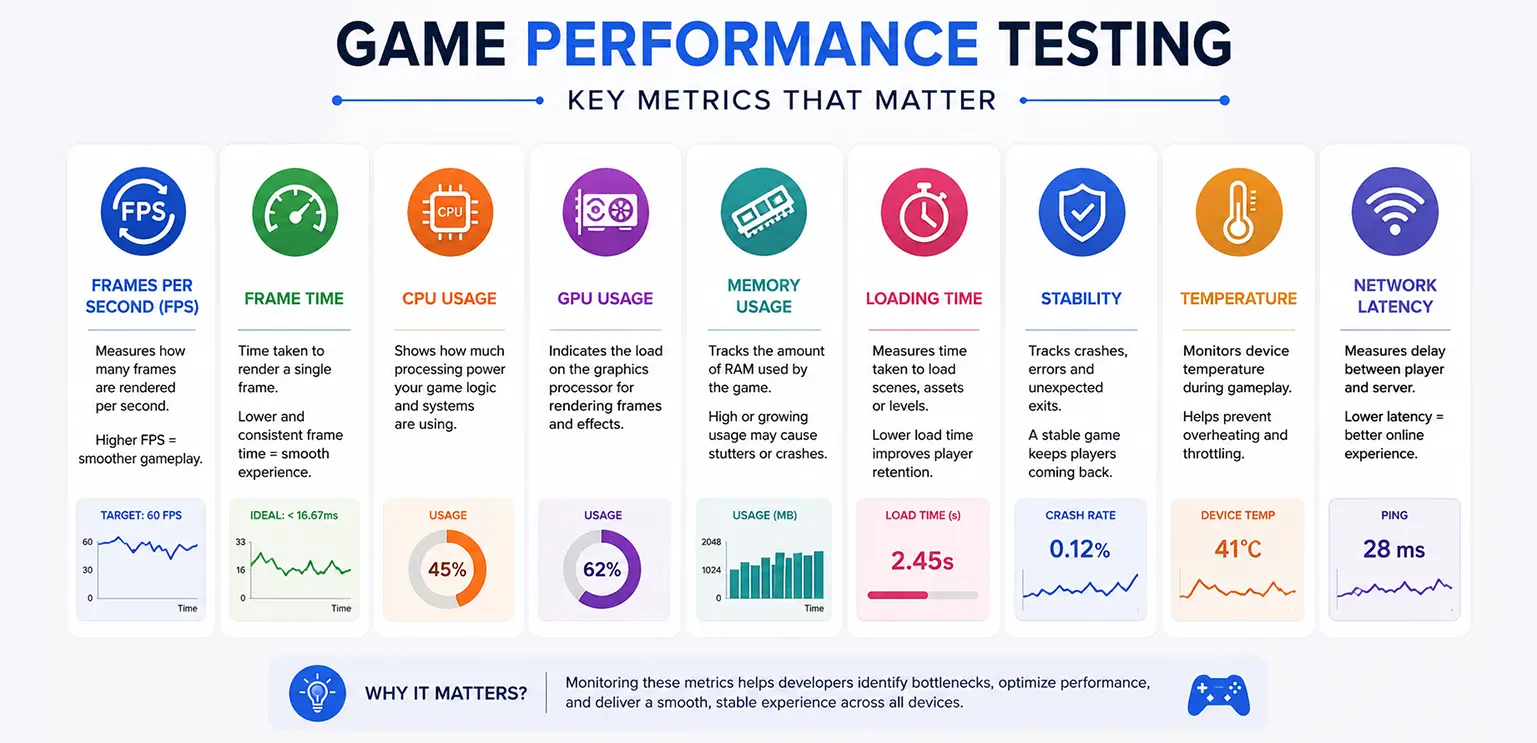
Which Game Performance Metrics Should Developers Monitor?
The right metrics depend on the game's design and platform. A mobile puzzle game, a multiplayer action game, and a browser-based slot game will not have identical performance requirements.
The following metrics provide a useful starting point.
| Metric | What to monitor |
|---|---|
| FPS and frame time | Frame delivery, slow frames, and stutters. |
| CPU and GPU performance | Processing and rendering costs. |
| Memory usage | Peak consumption, allocations, and growth during long sessions. |
| Loading time | Startup, scene changes, and asset-loading delays. |
| Stability | Crashes and failures during repeated gameplay cycles. |
| Temperature and power use | Sustained performance, heat, and battery consumption. |
| Network performance | Latency and server response times for online games. |
Why FPS alone is not enough
FPS is useful, but an average can conceal occasional long frames that players notice as stutters.
For example, two builds may report a similar average frame rate while one experiences more frequent spikes during combat, transitions, or animation-heavy scenes.
Frame-time distributions, slow-frame frequency, and suitable percentile measurements provide additional context. Teams should also record the test device, game build, scene, graphics settings, and test duration so that results can be compared fairly.
What Are the Main Types of Game Performance Testing?
Load testing
Load testing measures how the game behaves under an expected workload.
For a single-player game, the workload might include a complex scene with multiple characters, effects, and active UI elements. For an online game, it may involve expected numbers of concurrent users, active sessions, or server requests.
The objective is to verify performance under realistic operating conditions.
Stress testing
Stress testing pushes a system beyond its expected operating conditions to investigate its limits and failure behavior.
A team might test an unusually dense effect sequence, a burst of network activity, or a heavy combination of gameplay systems. The purpose is to understand how the game behaves when resources become constrained and whether it recovers appropriately.
Stress testing should use controlled conditions and defined safety limits.
Endurance testing
Endurance testing evaluates behavior during extended operation.
It can reveal gradual memory growth, repeated loading problems, performance degradation, and issues that appear only after many gameplay cycles.
This is useful for games intended to run for long sessions or remain active in demanding environments.
Scalability testing
Scalability testing examines how performance changes as the workload grows.
For an online game, that could mean increasing concurrent sessions or server activity. For a content-heavy game, it could involve increasing the number of active objects, visual effects, or simultaneous animations.
The team observes how resource use and response times change as demand increases.
Performance regression testing
Regression testing checks whether a new build maintains established performance levels.
Teams can automate repeatable tests for important scenes and compare the results after significant changes. Automated measurements are most useful when test conditions are controlled and results are interpreted alongside profiling data.
How to Test Game Performance: A Practical Workflow
A repeatable testing process helps developers move from detecting a problem to verifying a solution.
Step 1: Define performance requirements
Start by documenting what acceptable performance means for the project.
Specify target frame rate, loading-time limits, supported device categories, memory constraints, stability expectations, and any network requirements. These targets should be appropriate to the game rather than copied from another project.
A clear requirement turns a vague concern such as "the game feels slow" into something the team can investigate.
Step 2: Establish a baseline
Measure a known build before making major changes.
Record performance in representative scenes and gameplay states, including startup, normal play, complex transitions, and the heaviest expected effects. Keep device specifications and graphics settings consistent.
The baseline provides a comparison point for later builds and helps distinguish a new regression from an existing limitation.
Step 3: Test on representative hardware
Use the development environment for initial investigations, but verify results on actual target devices.
Include lower-specification hardware where relevant, different screen sizes, supported operating systems, and devices that represent the intended audience.
For browser-based games, include relevant browsers and hardware configurations. Record loading behavior and responsiveness in addition to rendering performance.
Step 4: Profile the most demanding scenarios
Focus on scenes that show slow frames, unusually high resource usage, or inconsistent behavior.
Use profiling tools to examine CPU and GPU frame time, rendering work, memory allocations, asset loading, and other relevant measurements. Compare the evidence against the baseline to narrow down the likely cause.
Avoid changing multiple unrelated variables at once. Controlled comparisons make it easier to determine which change actually improved performance.
Step 5: Optimize the identified bottleneck
Choose the optimization based on the evidence.
Possible actions include simplifying expensive rendering operations, reducing unnecessary object updates, improving asset loading, managing memory allocations, or adjusting visual-effect complexity.
Not every project needs every optimization. A CPU-bound scene requires a different approach from a GPU-bound scene, and reducing texture size will not automatically fix expensive game logic.
Step 6: Retest and compare
Repeat the original test using the same conditions.
Compare frame-time behavior, resource consumption, loading time, stability, and any other metrics relevant to the change. Confirm that the optimization improved the intended outcome without creating new problems elsewhere.
Document the results and retain the measurements for future regression checks.
Why Art, Animation, and Visual Effects Also Need Performance Testing
Performance is not solely a programming concern. The assets and effects displayed by a game can affect rendering workload, memory use, and loading behavior.
Consider a hypothetical 2D game with character animation, animated symbols, glowing overlays, and particle effects during a large win sequence. Each asset may look good individually, but their combined workload could produce slow frames on some devices.
A useful test would compare the scene with effects disabled against the complete sequence. Developers could then investigate rendering cost, texture usage, transparency overdraw, animation updates, and resource allocation to identify the largest contributors. The same principle applies to:
-
2D Spine animations: Test complex animation states and simultaneous characters rather than evaluating only isolated clips.
-
Particle effects: Measure performance at representative and peak particle counts.
-
UI transitions: Check whether overlays, scaling, and screen changes introduce frame-time spikes.
-
Sprite sheets and textures: Evaluate memory use, loading behavior, and rendering requirements on target devices.
-
Win celebrations and other peak moments: Test the full sequence, including overlapping effects, sounds, and UI updates.
The goal is not to remove visual quality indiscriminately. It is to understand the cost of visual decisions and find a suitable balance between presentation and performance.
Which Tools Can Help With Game Performance Testing?
The best tool depends on the engine, platform, and problem being investigated.
Tool availability and supported metrics depend on engine versions, platform integrations, and project configuration. Check the official documentation for the specific version being used.
A profiler helps explain where time or resources are going. It does not automatically determine the correct optimization. Developers still need to interpret the evidence, make controlled changes, and measure the outcome.
Common Game Performance Testing Mistakes
Even teams that regularly test can miss important issues if their process is inconsistent.
-
Testing only on high-end devices. This can hide problems that affect players with less capable hardware. Include representative lower-specification devices in the test plan.
-
Relying only on editor performance. Editor overhead and development settings can differ from a packaged build. Test the actual build on target hardware.
-
Measuring only average FPS. Averages can hide stutters. Review frame-time behavior and the frequency of slow frames.
-
Testing only at the end of development. Late discoveries may require changes across code, assets, and design. Establish baselines and test throughout production.
-
Optimizing without profiling. Guesswork can waste time or move the bottleneck elsewhere. Use measurements to prioritize the work.
-
Ignoring long sessions. Short tests may not reveal memory growth, thermal effects, or repeated-loading issues. Include endurance tests where appropriate.
-
Changing too many variables at once. If multiple settings change between builds, it becomes difficult to attribute improvements. Keep comparisons controlled.
-
Treating one successful test as proof of universal performance. Results apply to the conditions measured. Expand coverage to relevant devices, scenes, and configurations.
Best Practices for a Reliable Game Performance Testing Strategy
To make performance testing part of normal production, teams should:
-
Set measurable targets. Document performance expectations for each supported platform and device category.
-
Profile early and regularly. Capture a baseline before major changes and monitor performance as the game evolves.
-
Prioritize representative worst-case scenarios. Include demanding scenes, simultaneous effects, complex animations, and other peak workloads.
-
Use real-device testing. Validate packaged builds on hardware that reflects the intended player base.
-
Automate repeatable checks. Run performance regression tests for important scenes and features where automation is practical.
-
Record test conditions. Save the build version, hardware, settings, scene, duration, and measured results.
-
Retest after optimization. Confirm that changes solve the intended problem and do not create new bottlenecks.
-
Share responsibility across disciplines. Developers, QA engineers, technical artists, and designers should understand how their changes can affect performance.
A practical performance report should state the observed issue, the conditions under which it occurred, the supporting measurements, the likely cause, the change made, and the retest result.
Final Thoughts
Game performance testing helps development teams move beyond assumptions and make decisions based on measurable behavior. It can expose rendering bottlenecks, memory issues, loading delays, device-specific limitations, and regressions before they become release problems.
The most effective approach is continuous: define requirements, establish a baseline, test representative workloads, profile the bottlenecks, optimize carefully, and measure again.
For studios building visually rich games, performance testing should cover both the underlying systems and the content players actually see, including animation, UI, and visual effects.
At Gamix Labs, game development involves bringing together game art, animation, frontend implementation, and technical requirements. If you are planning a new game or refining an existing project, explore Gamix Labs to learn more about the studio's game development capabilities and discuss your project requirements.
Frequently Asked Questions
Why is performance testing important in game development?
Performance testing helps developers identify frame drops, excessive memory use, loading delays, overheating, and stability problems before release. It provides measurable evidence about how a game behaves under realistic conditions, allowing teams to prioritize optimizations and verify that the game meets its requirements across supported devices and platforms.
What is the difference between game testing and performance testing?
Game testing is a broad activity that evaluates gameplay, functionality, usability, compatibility, and other quality requirements. Performance testing focuses specifically on efficiency and responsiveness, including frame time, FPS, memory consumption, loading behavior, and stability under different workloads. Performance testing is one important part of a wider game QA strategy.
How do developers test game performance?
Developers define performance targets, establish a baseline, and run repeatable tests on representative hardware. They use profiling tools to measure CPU and GPU behavior, frame time, memory consumption, and loading performance. After identifying a bottleneck, they make a targeted change and repeat the same test to determine whether the change improved the result.
Which metrics matter most when testing game performance?
The most relevant metrics depend on the game and its platform. Common measurements include FPS, frame time, CPU and GPU performance, memory usage, loading time, crash rates, and device temperature. Online games may also require network latency and server response-time measurements. Tracking several related metrics provides a clearer picture than relying on average FPS alone.
How often should game performance testing be performed?
Performance testing should take place throughout development, not just before release. Establish a baseline early, test after significant code or content changes, and repeat regression checks before major releases. Continuous or automated testing can help teams identify unexpected slowdowns, while periodic testing on real devices validates performance under practical conditions.
Why should mobile games be tested on real devices?
Real-device testing reveals hardware and operating-system differences that may not appear in an editor or simulator. CPU and GPU capabilities, memory limits, thermal behavior, and power consumption can all affect gameplay. Testing representative devices helps developers identify performance limitations and determine whether different quality settings or optimizations are necessary.
Can game art, animation, and particle effects affect performance?
Yes. Complex animations, large textures, transparent layers, and numerous simultaneous particle effects can increase rendering workload, memory consumption, or processing time. The impact depends on implementation and hardware. Profiling demanding scenes helps technical artists and developers identify costly assets or effects and optimize them without unnecessarily sacrificing visual quality.
What tools are used for game performance testing?
Common options include Unity Profiler for Unity projects, Unreal Insights for Unreal Engine projects, Android profiling tools for Android devices, and automated scripts for repeatable benchmarks. Online games may also need server monitoring and load-testing tools. Choose tools based on the engine, target platform, metrics required, and the specific issue being investigated.