Automating Testing in Unity with CI/CD Pipelines
Introduction: Why Manual Testing No Longer Scales
In early-stage game development, testing is often manual. A developer builds the game, runs it locally, checks a few flows, and moves on. That works for a while. But as Unity projects grow, this approach breaks down quickly.
Modern game projects involve:
- Complex gameplay systems
- Multiple platforms such as Android, iOS, WebGL, and PC
- Frequent updates and Live Ops releases
- Large teams working in parallel
Without automation, testing becomes:
- Slow
- Inconsistent
- Error-prone
- Difficult to scale
This is where CI/CD pipelines, or Continuous Integration and Continuous Delivery, become essential. For game studios, automating testing in Unity is no longer optional. It is a practical advantage that helps teams:
- Catch bugs early
- Reduce regression issues
- Accelerate release cycles
- Maintain build stability across teams
Just as studios optimize other parts of Unity production, such as build size for distribution targets, they also need reliable testing infrastructure to keep quality under control as projects scale.
This guide explores how Unity developers implement automated testing using CI/CD pipelines, along with practical strategies and real-world workflows.
Industry Context: The Shift Toward DevOps in Game Development
Game development is steadily adopting practices from traditional software engineering. Concepts such as:
- Continuous Integration
- Continuous Delivery
- Automated testing
- DevOps workflows
are now standard in many modern studios.
The reason is straightforward. Games today are no longer static products shipped once and left alone. They are often:
- Live service products
- Frequently updated systems
- Cross-platform experiences
In mobile gaming, iGaming, and multiplayer products, updates may be deployed weekly, daily, or even multiple times per day. Manual testing cannot keep up with that pace. CI/CD pipelines allow studios to increase release velocity without giving up quality control.
What Is a CI/CD Pipeline in Unity Development?
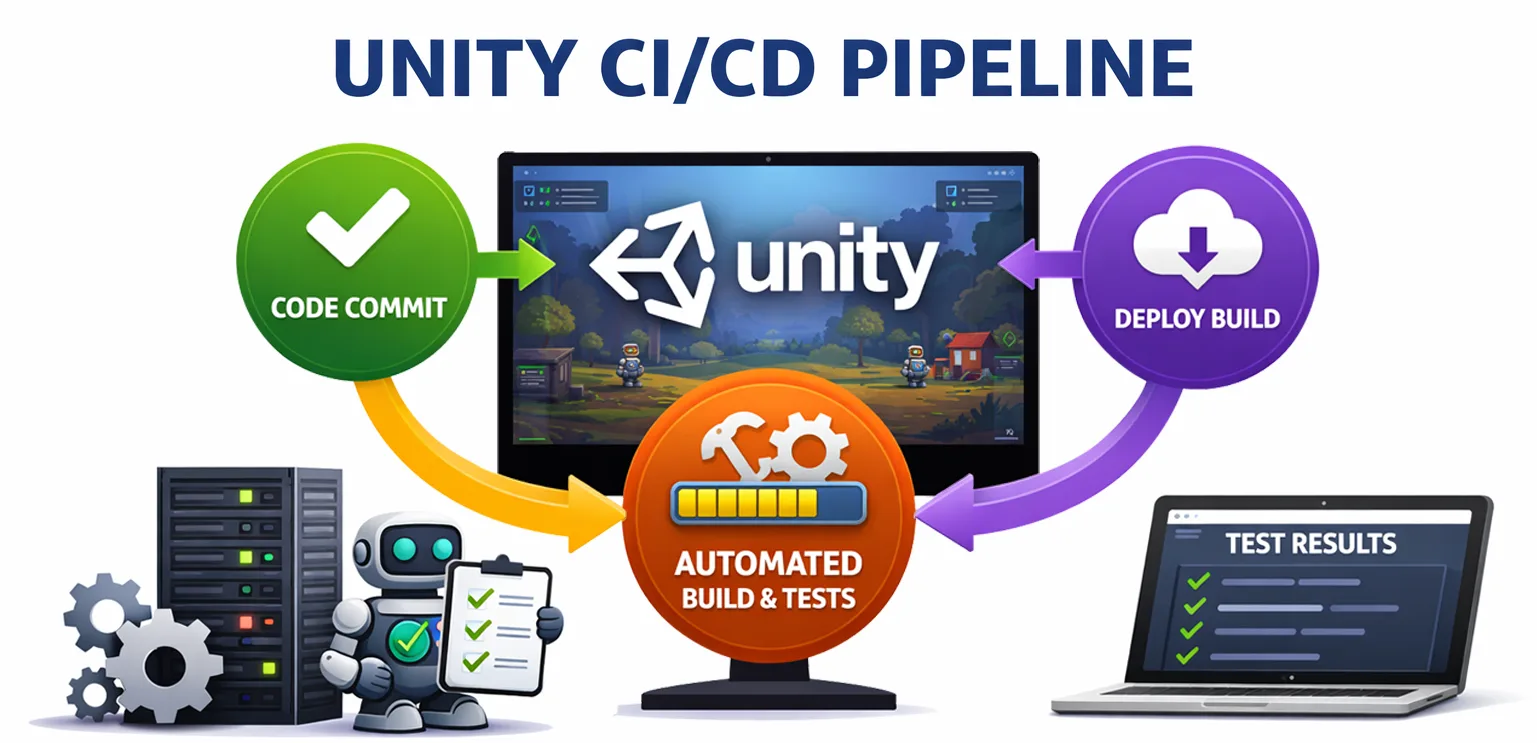
A CI/CD pipeline is an automated workflow that:
- Pulls the latest code changes
- Builds the project
- Runs automated tests
- Reports results
- Optionally deploys the build
In Unity, this usually involves a mix of:
- Version control systems such as Git or Perforce
- Build automation tools
- Testing frameworks
- Cloud-based CI platforms
Every time a developer commits code, the pipeline can run automatically. This helps ensure that:
- New changes do not break the game
- Bugs are detected early
- Builds remain stable
Types of Testing in Unity
Before setting up a pipeline, it is important to understand which kinds of tests can be automated.
🔹 Unit Tests
Unit tests verify small, isolated pieces of logic. Examples include:
- Damage calculation systems
- Inventory logic
- Currency calculations
These tests are usually fast and give immediate feedback.
🔹 Integration Tests
Integration tests verify how systems behave together. Examples include:
- Player movement interacting with physics
- UI interacting with backend systems
- Gameplay events triggering animations
🔹 Play Mode Tests
Unity supports Play Mode testing for runtime behavior. These tests simulate real gameplay scenarios, such as:
- Level progression
- Enemy behavior
- UI interactions
🔹 Performance Tests
Performance tests help confirm that the game runs within acceptable limits. Examples include:
- Frame rate stability
- Memory usage
- Loading times
🔹 Regression Tests
Regression tests confirm that new changes do not break existing functionality. These are especially important for Live Ops environments where content and code are updated frequently.
Setting Up Automated Testing in Unity
Unity provides built-in support for automated testing, but successful automation also depends on project architecture.
🔹 Unity Test Framework
The Unity Test Framework allows developers to write and run automated tests directly inside Unity. It supports:
- Edit Mode tests for fast logic validation
- Play Mode tests for runtime simulation
- CI integration for automated execution
Tests are typically written in C# using NUnit.
🔹 Structuring Testable Code
To make automation effective, code needs to be testable. Best practices include:
- Separating game logic from UI
- Using dependency injection where appropriate
- Avoiding tightly coupled systems
- Keeping services and gameplay rules modular
Testable architecture is the foundation of reliable CI/CD. Without it, teams often end up with fragile tests that are expensive to maintain.
Building a CI/CD Pipeline for Unity
Once tests are in place, the next step is integrating them into a continuous workflow.
Step 1: Version Control Integration
The pipeline begins when code is pushed to a repository. Common systems include:
- GitHub
- GitLab
- Bitbucket
- Perforce
This commit or pull request becomes the trigger for automated validation.
Step 2: Build Automation
The CI server automatically builds the Unity project. Build targets may include:
- Android
- iOS
- WebGL
- PC
Automated builds make sure the project still compiles correctly across target platforms.
Step 3: Running Automated Tests
After the build stage, the pipeline executes the automated test suite. This may include:
- Unit tests
- Integration tests
- Play Mode tests
If something fails, the team gets feedback immediately.
Step 4: Reporting Results
Developers receive reports showing:
- Passed tests
- Failed tests
- Error logs
- Build status
This feedback loop is critical for fast debugging and quick iteration.
Step 5: Deployment (Optional)
When a build passes validation, the pipeline can continue by:
- Uploading builds to testing environments
- Distributing builds to QA teams
- Deploying to staging servers
Popular CI/CD Tools for Unity Projects
Several tools are commonly used for Unity automation pipelines.
🔹 Unity Cloud Build
Unity offers its own cloud-based build system. Key benefits include:
- Automated builds
- Platform support
- Integration with Unity services
🔹 Jenkins
Jenkins remains a common choice in game development.
Pros:
- Highly customizable
- Supports complex workflows
Cons:
- Requires setup and maintenance
🔹 GitHub Actions
GitHub Actions is a popular modern solution for teams using GitHub repositories.
Benefits include:
- Easy setup
- Scalable workflows
- Strong community support
🔹 GitLab CI/CD
GitLab CI/CD provides integrated DevOps tooling with flexible automation features and strong support for self-hosted workflows.
Real Example: CI/CD Pipeline in a Mobile Game Studio
Consider a mobile game studio working on a Live Ops-driven Unity project. A typical pipeline might look like this:
- A developer commits code.
- The CI pipeline triggers automatically.
- A Unity Android build starts.
- Unit tests and Play Mode tests run.
- The build is uploaded to an internal testing server.
- The QA team receives a notification.
The result is straightforward:
- Bugs are caught earlier
- Builds stay stable
- Release cycles move faster
This kind of workflow gives teams confidence to ship updates more frequently without relying on large manual verification passes every time.
Benefits of Automating Testing in Unity
Automated testing creates several direct benefits for Unity teams.
🔹 Faster Development Cycles
Teams can ship more often because validation happens continuously rather than only at the end of a sprint.
🔹 Early Bug Detection
Problems are identified right after code changes, when they are easier and cheaper to fix.
🔹 Reduced Manual Testing Effort
QA teams can spend more time on exploratory testing and complex gameplay scenarios instead of repetitive checks.
🔹 Improved Team Collaboration
Pipelines create a shared quality standard. Everyone sees the same build status, test failures, and deployment health.
🔹 Better Live Ops Support
Games that update often need dependable release processes. Automated validation makes Live Ops less risky and easier to manage.
Common Challenges in Unity CI/CD Implementation
Despite the benefits, implementing CI/CD in Unity comes with practical challenges.
🔹 Long Build Times
Unity builds can take several minutes or more.
Possible solutions:
- Optimize build settings
- Use incremental builds where possible
- Split validation by target platform
🔹 Flaky Tests
Some tests fail intermittently because of timing issues or unstable environments.
Possible solutions:
- Stabilize test environments
- Avoid timing-dependent logic
- Isolate scene and data dependencies
🔹 Asset Dependencies
Large Unity projects often include many assets, which can slow pipelines.
Possible solutions:
- Optimize asset management
- Use caching systems
- Limit unnecessary asset imports in test jobs
🔹 Platform-Specific Issues
Different platforms may expose different bugs.
Possible solution:
- Run platform-specific test and build jobs when needed
Best Practices for Unity CI/CD Pipelines
Studios that use CI/CD effectively tend to follow a few consistent principles.
🔹 Keep Tests Fast and Focused
Short, reliable tests run more often and produce faster feedback.
🔹 Run Tests on Every Commit
Frequent testing prevents issues from piling up.
🔹 Separate Build and Test Pipelines
Separating these stages improves flexibility and can reduce wasted build time.
🔹 Use Parallel Testing
Running tests in parallel can significantly reduce total pipeline duration.
🔹 Monitor Pipeline Performance
Studios should regularly review build times, failure patterns, and test stability to keep automation effective over time.
The Future of Automated Testing in Game Development
Automation in game development will continue to evolve. Trends worth watching include:
🔹 AI-Driven Testing
AI-assisted systems may help identify edge cases, broken flows, and unusual gameplay behavior more efficiently.
🔹 Cloud-Based Test Environments
Cloud platforms are making it easier to scale build and test infrastructure without maintaining large internal server setups.
🔹 Continuous Deployment for Games
Some studios are moving beyond CI into full deployment automation for internal environments, staging branches, and selected live updates.
As projects become more service-oriented, the boundary between game development and DevOps will continue to narrow.
Conclusion
Automating testing in Unity with CI/CD pipelines is no longer a luxury. It is a necessity for modern game development. As games become more complex and release cycles accelerate, manual testing alone cannot protect quality.
CI/CD pipelines allow studios to:
- Catch bugs early
- Maintain stable builds
- Release updates faster
- Scale development workflows
For studios that want to compete in fast-moving markets, investing in automated testing infrastructure is one of the highest-leverage technical decisions they can make.
FAQ: Automating Testing in Unity
What is CI/CD in Unity development?
CI/CD is a process where code changes are automatically built, tested, and deployed, ensuring continuous integration and delivery of stable game builds.
Does Unity support automated testing?
Yes. Unity provides the Unity Test Framework, which supports unit tests, integration tests, and Play Mode tests.
What tools are used for Unity CI/CD?
Common tools include Unity Cloud Build, Jenkins, GitHub Actions, and GitLab CI/CD.
Can Unity tests run automatically on every commit?
Yes. CI/CD pipelines can be configured to run tests whenever code is pushed to the repository.
Why is automated testing important for game development?
It helps detect bugs early, reduce manual testing effort, and maintain stable builds across frequent updates.
Are CI/CD pipelines suitable for small game studios?
Yes. Even small teams benefit from automated testing, as it improves efficiency and reduces development risks.